CSS letter-spacing in Photoshop and browsers
Tracking, or letter-spacing as the property is called in CSS, allows a web designer to set the space wanted between each character of a text. Through this article I'll show you my findings about it's implementation in various browsers and in Photoshop.
What's the letter-spacing ?
The W3C's definition is rather simple and straight-forward :
The letter-spacing property specifies spacing behavior between text characters.
http://www.w3.org/wiki/CSS/Properties/letter-spacing
In other words, it's the designer's way to specify the space between the characters of a text. It supports various values :
inherit: uses it's parent computed valuenormal: uses the default value- length : number with unit
Implementations in browsers
Most informations about the support of the property can be found on http://reference.sitepoint.com/css/letter-spacing.
Full Support
- Internet Explorer 8+
- Firefox 1+
- Safari 1.3+
- Opera 9.2+
- Chrome 2+
Calculating letter-spacing value from Photoshop
Photoshop doesn't show the unit used for the letter spacing setting. The value is based on the font-size, with some test, I found that a value in Photoshop of 1000 is equal to 1em in CSS.
X / 1000 = Y
Where X is the value of the letter-spacing in Photoshop and Y is the value in em to use in CSS
Photoshop to em "formula"
If you wish to get the same result in pixels instead of ems, the formula isn't much more complex
X * S / 1000 = P
Where X is equal to the letter-spacing value in Photoshop, S is the font-size in pixels (which is equal to the value in point provided you're working in 72dpi) and P is the resulted value in px to use in CSS
Photoshop to px "formula"
Computed values in browsers
When using em (or an other relative unit) some browsers will compute that value into pixels and eventually round it up, down or to the closest integer. Here are the results of common browsers.
First of all here is the test page used to see how browsers would render different values set in em : http://lab.justinmarsan.com/letter-spacing/
Not rounding
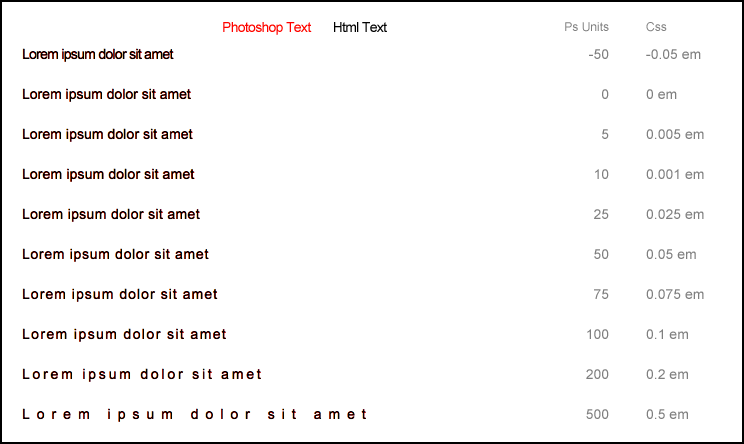
Firefox doesn't round the values. Best case scenario, unfortunately it's the only one of the major browsers to do so.
Almost not rounding
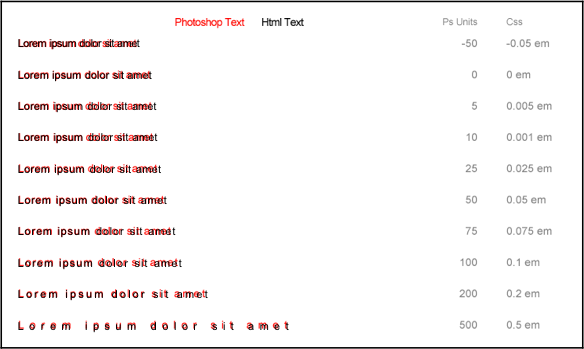
Safari on iOS4.3 is in between, same for IE9 the result is really close to what's expected but for some reason not pixel perfect. Here is how it looks like on Safari iOS :
Rounding to the closest integer
Other browsers will round to the closest integer, this includes Chrome, IE6~8, Opera, Safari. Here is how it looks like in Chrome :
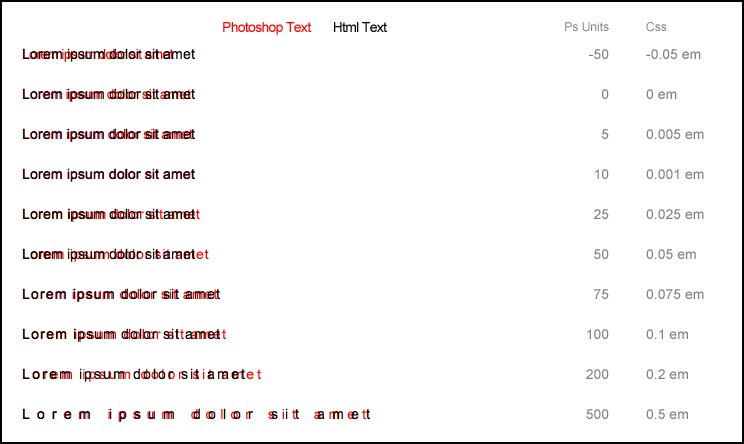
When no version number is specified, the screenshot has been taken in the last version of the browser available on Jan. 13 2012
Choosing between em or px
With the previous versions of Webkit, this was a tough choice to make as the result in Safari, Chrome and all browsers/softwares using Webkit would see their values rounded down, making 0.9px to be rendered as 0px. With the update it becomes much simpler : em will provide the exact result on capable browsers (Firefox, Safari on iOS, IE9) and rounded to the closest integer when computed in pixels in others.
Test pages and screenshots
http://lab.justinmarsan.com/letter-spacing/ is the page that was used to test the difference between the value set in em and the actual result in browser.
http://lab.justinmarsan.com/letter-spacing/screenshots/ contains the screenshots taken during those test for last versions of major browsers (and IE from version 6 to 9).
